
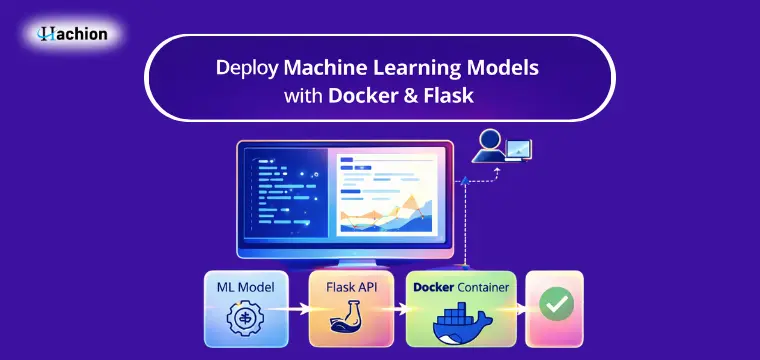
Deploy Machine Learning Models with Docker & Flask
Building a machine learning model is only half the job. The real value comes when your model is available for users, applications, or websites to use. This process is called deployment.
In simple words, deployment means making your trained model accessible through an API so that others can send data and get predictions in real time.
Two popular tools make this process easier:
- Flask – a lightweight Python web framework to create APIs
- Docker – a container tool to package your application and run it anywhere
In this guide, you will learn how to deploy a machine learning model using Flask and Docker in a simple and practical way.
https://api.hachion.co/prod/upload_all_images/Artificial_Intelligence_Machine_Learning_with_AI_real-time-scenario.webp
Why Deployment is Important in Machine Learning
Many beginners stop after training the model in Jupyter Notebook. But companies need models that can be used inside websites, apps, or business systems.
Deployment helps you:
- Serve predictions in real time
- Share your model with other applications
- Run your model on any system without dependency issues
- Move from learning to real-world implementation
This is a key skill taught in any practical AI online course because it connects theory with real usage.
Step 1: Train and Save Your ML Model
First, you need a trained model saved as a file.
Example (Python):
import pickle
from sklearn.linear_model import LogisticRegression
model = LogisticRegression()
model.fit(X_train, y_train)
pickle.dump(model, open('model.pkl', 'wb'))
This creates a file called model.pkl which we will use inside our Flask app.
Step 2: Create a Flask API
Now, create a file named app.py.
from flask import Flask, request, jsonify
import pickle
import numpy as np
app = Flask(__name__)
model = pickle.load(open('model.pkl', 'rb'))
@app.route('/')
def home():
return "ML Model API is running"
@app.route('/predict', methods=['POST'])
def predict():
data = request.get_json(force=True)
prediction = model.predict([np.array(data['input'])])
return jsonify({'prediction': prediction.tolist()})
if __name__ == '__main__':
app.run(host='0.0.0.0', port=5000)
This code creates an API endpoint /predict that accepts input data and returns predictions.
Step 3: Create Requirements File
Create requirements.txt:
flask
numpy
scikit-learn
This tells Docker which libraries to install.
Step 4: Create Dockerfile
Now create a file named Dockerfile.
FROM python:3.10-slim
WORKDIR /app
COPY . /app
RUN pip install --no-cache-dir -r requirements.txt
EXPOSE 5000
CMD ["python", "app.py"]
This file defines how Docker will build your application.
Step 5: Build Docker Image
Open terminal in your project folder and run:
docker build -t ml-flask-app .
This creates a Docker image.
Step 6: Run Docker Container
docker run -p 5000:5000 ml-flask-app
Now your model API is live at:
http://localhost:5000
Step 7: Test the API
Use Postman or curl:
curl -X POST http://localhost:5000/predict \
-H "Content-Type: application/json" \
-d '{"input":[5.1,3.5,1.4,0.2]}'
You will receive a prediction response.
Benefits of Using Docker for ML Deployment
- No “works on my machine” problem
- Easy to move to cloud servers
- Same setup for development and production
- Lightweight and fast
- Easy scaling
These practices are part of professional AI Training because industries need portable and reliable ML systems.
Real-World Use Cases
This setup is used in:
- Fraud detection systems
- Recommendation engines
- Chatbots and NLP apps
- Healthcare prediction systems
- E-commerce personalization
Common Mistakes to Avoid
- Not saving the model properly
- Hardcoding paths in Flask app
- Forgetting requirements.txt
- Not exposing the correct port in Docker
- Sending wrong JSON format while testing
Best Practices
- Use virtual environments before Dockerizing
- Log errors in Flask for debugging
- Keep Docker image size small
- Use environment variables for configuration
- Test locally before deploying to cloud
Conclusion
Deploying machine learning models is an essential step that turns your project into a usable application. With Flask, you can create simple APIs, and with Docker, you can ensure your app runs anywhere without issues.
Once you understand this process, you can deploy models to cloud platforms like AWS, Azure, or GCP easily. Learning deployment is what separates beginners from professionals in the machine learning field.
Practice this setup once, and you will be confident to deploy any ML model in real-world projects.
FAQs
1. Why use Flask for ML deployment?
Flask is simple, lightweight, and perfect for creating APIs for machine learning models.
2. What is the role of Docker here?
Docker packages the application with all dependencies so it can run on any system.
3. Can I deploy this Docker container to cloud platforms?
Yes, you can deploy it to AWS, Azure, GCP, or any server that supports Docker.
4. Do I need advanced DevOps knowledge for this?
No. Basic command-line knowledge is enough to start.
5. Can this method be used for deep learning models?
Yes, you can deploy TensorFlow, PyTorch, or any other models using the same method.


